
Introduction
Implementing Odoo is not just a technical project; it’s a business transformation initiative. With Odoo evolving rapidly and businesses demanding faster ROI in 2026, a structured implementation checklist is essential to avoid delays, cost overruns, and adoption issues.
This practical, step-by-step Odoo implementation checklist will help you plan, execute, and scale your ERP successfully.
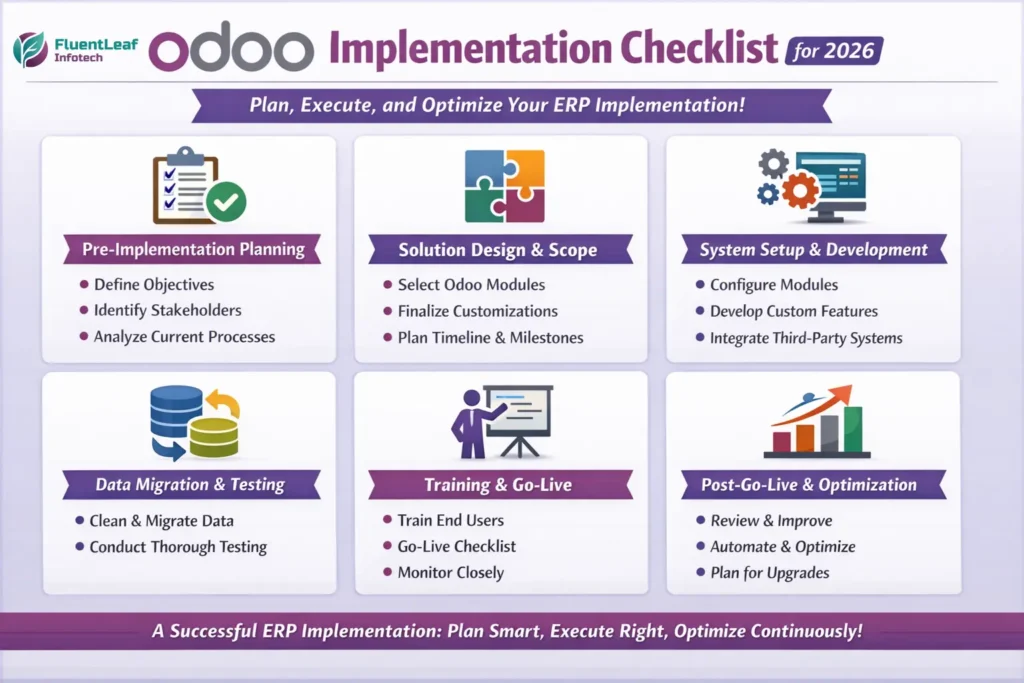
Phase 1: Pre-Implementation Planning (Most Critical)
1. Define Clear Business Objectives
Before touching Odoo:
- Identify pain points (manual work, data silos, poor reporting)
- Define success metrics (faster order processing, inventory accuracy, real-time insights)
- Align goals with business growth plans for the next 3-5 years
Tip: Avoid “we want everything automated.” Be specific.
2. Identify Stakeholders & Core Team
Create a cross-functional implementation team:
- Project sponsor (decision-maker)
- Department heads (Sales, Accounting, Inventory, HR)
- Internal ERP champion
- Odoo implementation partner / consultant
Assign clear ownership for every module.
3. Analyze Current Processes (As-Is Study)
Document how your business operates today:
- Sales to invoicing flow
- Procurement to vendor payments
- Inventory movement
- Manufacturing or services delivery
- Accounting and compliance
This prevents blindly copying old inefficiencies into Odoo.
4. Map Future Processes (To-Be Design)
Design optimized workflows using Odoo’s standard features:
- Eliminate redundant approvals
- Reduce manual data entry
- Standardize reports
- Define automation rules
Golden rule: Configure first, customize last.
Phase 2: Solution Design & Scope Finalization
5. Select Required Odoo Modules
Choose only what you need for Phase 1:
- CRM & Sales
- Accounting & Invoicing
- Inventory & Purchase
- Manufacturing / Projects / HR
- Website or eCommerce (if applicable)
You can always add more modules later.
6. Decide on Hosting & Infrastructure
For 2026, evaluate:
- Odoo Online
- Odoo.sh
- Self-hosted (Cloud / On-premise)
Consider:
- Data security
- Performance
- Scalability
- Backup & disaster recovery
7. Finalize Customization Requirements
Clearly document:
- Custom fields
- Reports
- Approval workflows
- Integrations (payment gateways, shipping, BI tools)
Ensure every customization has:
- Business justification
- Impact analysis
- Estimated effort
8. Prepare Implementation Timeline & Milestones
Break the project into phases:
- Configuration
- Custom development
- Data migration
- Testing
- Training
- Go-live
Set realistic deadlines; not optimistic ones.
Phase 3: System Setup & Development
9. Configure Odoo Modules
This includes:
- Company setup
- Users & access rights
- Taxes, currencies, fiscal positions
- Warehouses and locations
- Chart of accounts
Configuration should reflect your To-Be processes.
10. Develop Required Custom Features
During development:
- Follow Odoo coding standards
- Keep modules upgrade-safe
- Document all changes
- Avoid hardcoding business logic
This ensures smooth future upgrades.
11. Integrate Third-Party Systems
Validate integrations for:
- Payment gateways
- Shipping carriers
- SMS / Email services
- Legacy systems
- BI or reporting tools
Test integrations under real data scenarios.
Phase 4: Data Migration & Testing
12. Clean & Prepare Data
Before migration:
- Remove duplicates
- Validate customer/vendor data
- Standardize product naming
- Close old or irrelevant records
Bad data = bad ERP experience.
13. Perform Data Migration
Migrate:
- Opening balances
- Customers & vendors
- Products & inventory
- Pending orders & invoices
Always test migration in a staging environment first.
14. Conduct Comprehensive Testing
Types of testing:
- Functional testing
- User acceptance testing (UAT)
- Integration testing
- Performance testing
Fix issues before go-live; not after.
Phase 5: Training & Go-Live
15. Train End Users Role-Wise
Provide:
- Department-specific training
- Real business scenarios
- Written SOPs & videos
User adoption is the biggest success factor.
16. Go-Live Preparation Checklist
Before launch:
- Final data validation
- User access review
- Backup confirmation
- Support team readiness
- Communication to all users
Choose a go-live date with low business impact.
17. Go-Live & Monitor Closely
In the first few weeks:
- Track issues daily
- Provide quick support
- Monitor performance
- Ensure data accuracy
Expect minor hiccups; it’s normal.
Phase 6: Post-Implementation & Optimization
18. Post Go-Live Review
Evaluate:
- Are objectives met?
- Are users comfortable?
- Any bottlenecks or unused features?
Gather feedback from all departments.
19. Optimize & Automate Further
After stabilization:
- Add advanced automation
- Introduce dashboards & KPIs
- Enable additional modules
- Improve reports
ERP improvement is continuous.
20. Plan for Future Upgrades
For 2026 and beyond:
- Keep customizations minimal
- Follow upgrade-safe practices
- Review new Odoo features annually
A future-ready ERP saves long-term costs.
Final Thoughts
A successful Odoo implementation is 70% planning and process clarity, 30% technology. By following this step-by-step Odoo Implementation Checklist, businesses in 2026 can reduce risks, improve adoption, and achieve faster ROI from Odoo.
📞 Contact us today to get started on your Odoo success journey!